Scanning & Analysis
Truvant scans AI agent extensions for security issues before they can cause harm. Scanning works locally — your code never leaves your machine.
What Gets Scanned
Truvant performs deep analysis across the full surface area of your AI agent environment. Each scan type targets a distinct class of risk:
- MCP server packages — npm packages, git repositories, and container images declared in your MCP configuration files.
- Claude Code plugins — hooks, skills, and scripts installed into Claude Code that can execute arbitrary code on your behalf.
- Tool schemas — MCP tool definitions checked for prompt injection, tool shadowing, and overly broad permission claims.
- Dependencies — Transitive dependency trees matched against OSV (Open Source Vulnerabilities) for known CVEs.
- Secrets — Hardcoded credentials, tokens, and keys detected using 25+ rule types covering API keys, SSH keys, cloud provider secrets, and more.
- Source code — Static analysis (SAST) for Python, Shell, JavaScript, and TypeScript, surfacing dangerous patterns and unsafe practices.
- Container images — Layer-by-layer extraction with SBOM generation to identify vulnerable packages within container-based MCP servers.
Scan Commands
Scan all local configs
The default mcpctl scan command discovers and scans all MCP servers configured on your machine.
# Scan all locally configured MCP servers (Claude Desktop, Claude Code, etc.)
mcpctl scan

# Scan a specific project directory for MCP configs
mcpctl scan ~/projects

# Scan without importing results into the artifact catalog
mcpctl scan --no-import
Scan a specific artifact
You can target a single artifact by package name, Git URL, or local path for a deep scan without modifying your configs.
# Scan an npm-hosted MCP server package
mcpctl scan @anthropic/mcp-server-filesystem

# Scan a git repository
mcpctl scan github.com/example/my-mcp-server

# Run a deep scan with extended analysis (slower, more thorough)
mcpctl scan --deep @anthropic/mcp-server-everything
Output formats
Scan results can be written in multiple formats for integration with CI pipelines and SIEM tools.
# Default human-readable output to stdout
mcpctl scan

# JSON output for programmatic consumption
mcpctl scan --json

# SARIF format for import into GitHub Code Scanning, VS Code, or any SARIF viewer
mcpctl scan --format sarif -o results.sarif
Artifact Catalog
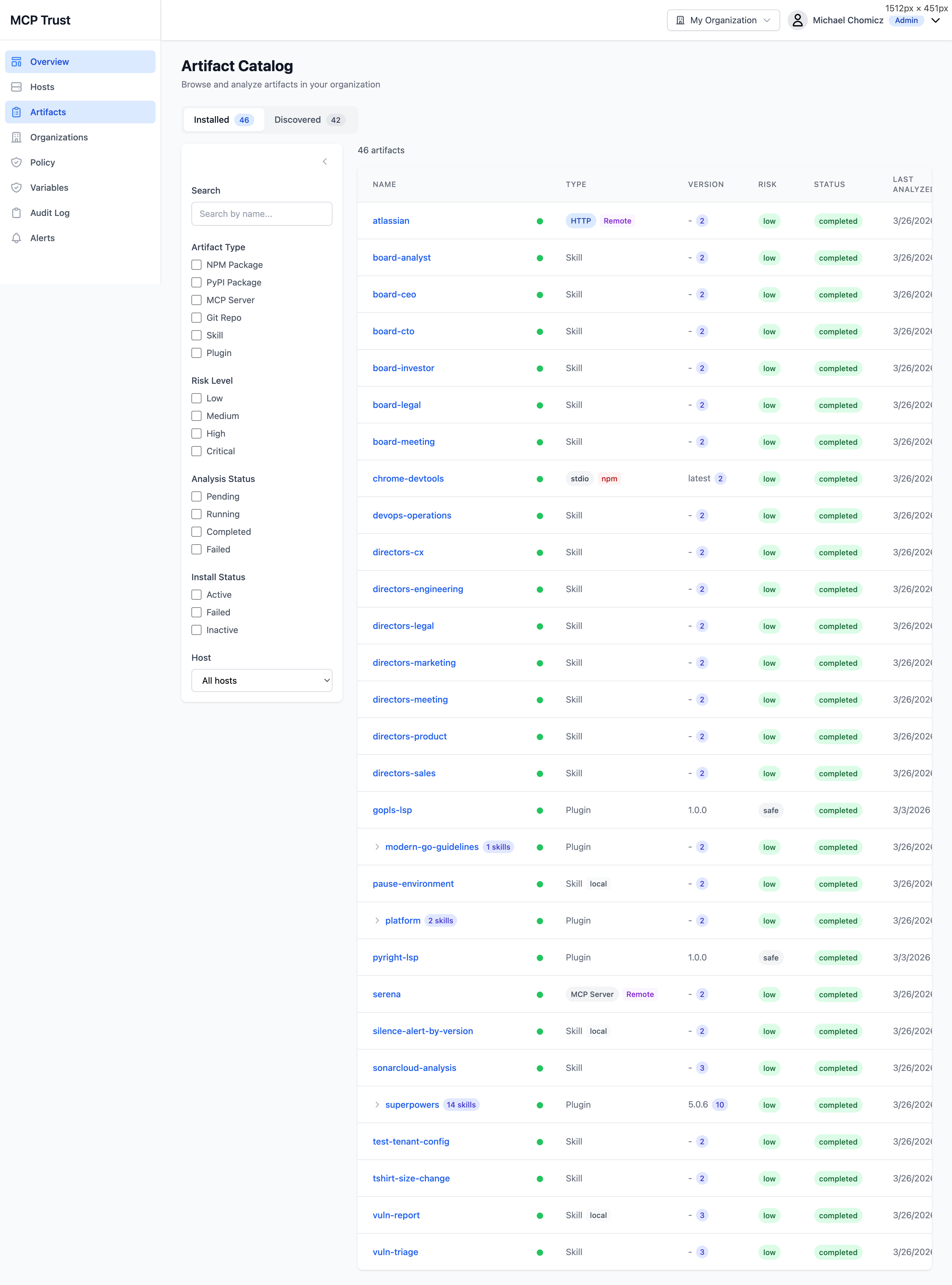
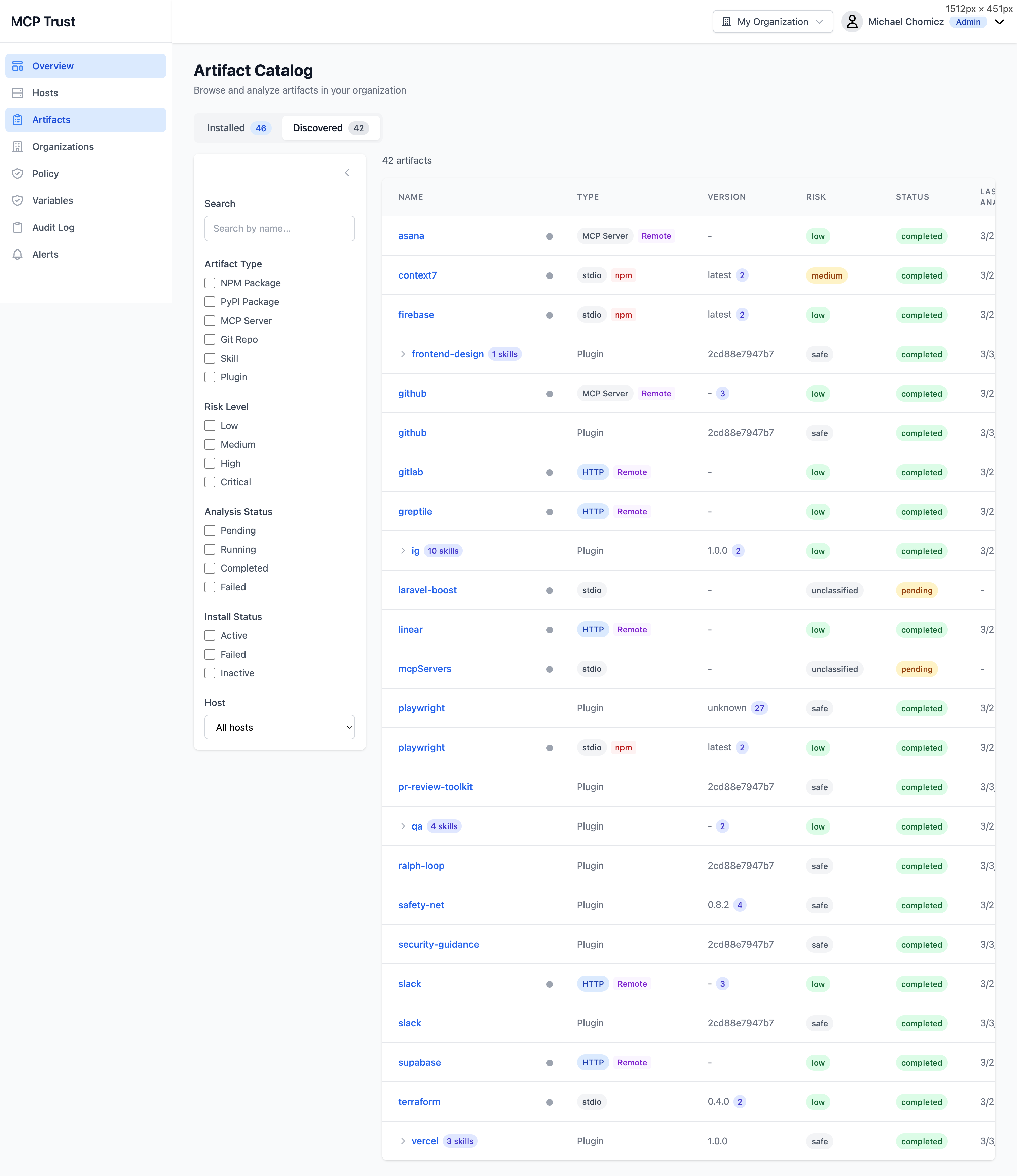
The Artifact Catalog lists every MCP server, plugin, and package that Truvant has encountered across your fleet. Artifacts are split into two views: Installed (currently active in a host's MCP config) and Discovered (detected but not yet installed, such as packages referenced by configs on other hosts or found during deep scans).
Filter the catalog using any combination of the following:
- Artifact Type — npm, git, container, remote endpoint, plugin.
- Risk Level — Critical, High, Medium, Low, Informational.
- Analysis Status — Complete, Pending, Failed, Not Analyzed.
- Install Status — Installed, Discovered, Removed.
- Host — Filter to a specific machine in your fleet.
Artifact Detail
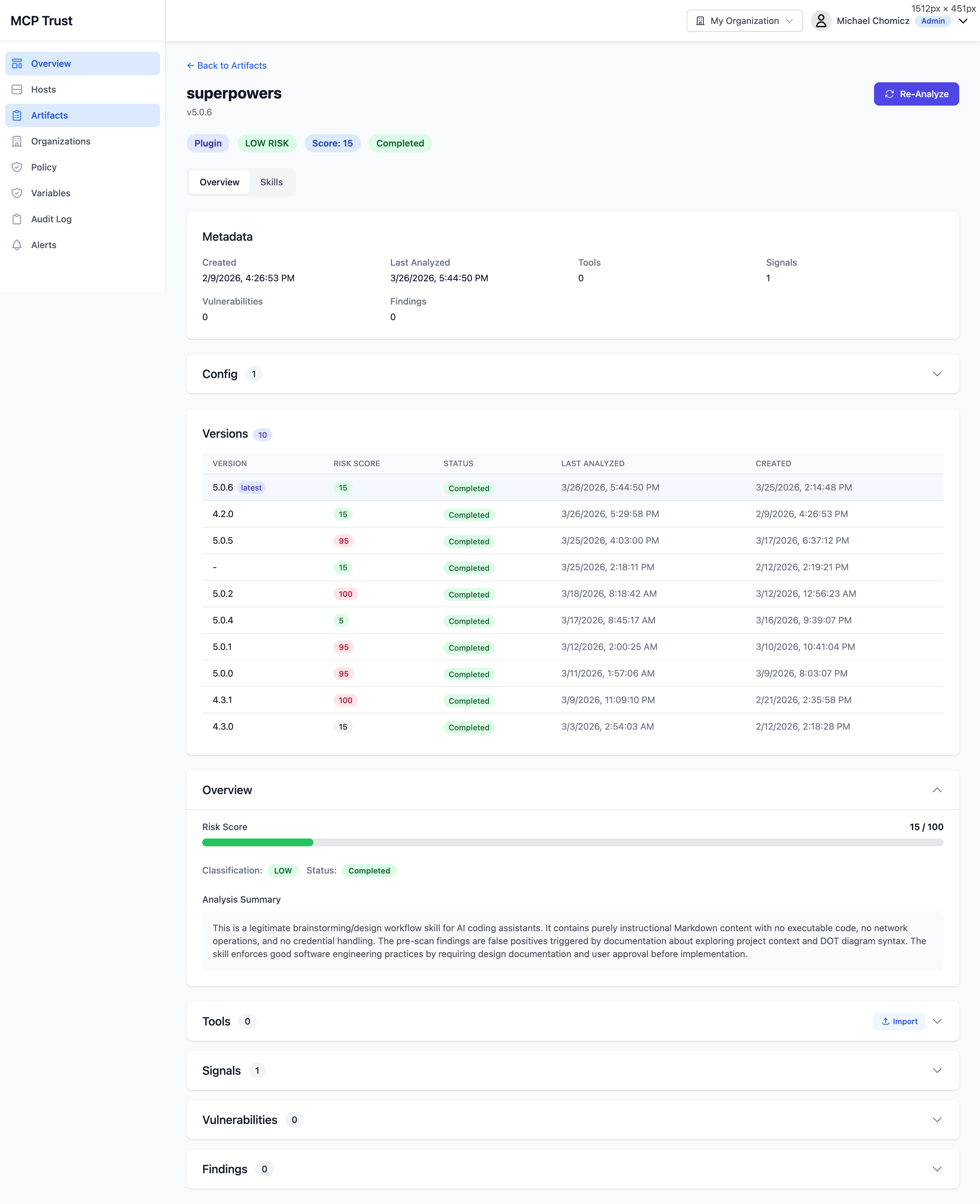
Click any artifact in the catalog to open its detail view. This is the primary interface for understanding the full security profile of an individual MCP server or plugin.
Overview
- Risk Score — A 0–100 composite score derived from vulnerability severity, secret findings, SAST signals, tool schema risk, and trust intelligence. Displayed as a color-coded badge: Low, Medium, High / Critical.
- Metadata — Package name, version, type, author, license, install path, and the hosts where this artifact is active.
- Version History — A timeline of previously analyzed versions with color-coded risk scores. Useful for spotting when a package's risk profile changed across releases.
- Config — The raw MCP configuration entry for this artifact as it appears in the host's config file.
- Analysis Summary — An AI-generated plain-English narrative describing what this artifact does, what permissions it claims, what risks were identified, and any notable findings. Updated each time the artifact is analyzed.
- Re-Analyze — Trigger a fresh analysis run against the current version of the artifact on demand, rather than waiting for the next scheduled scan cycle.
Expandable sections
- Tools — All MCP tool definitions exposed by this server, each rated on a four-level risk scale: L1 (minimal), L2 (moderate), L3 (elevated), L4 (critical). Risk is derived from the tool's declared schema, parameter types, and capability claims.
- Signals — Behavioral and reputation signals used to compute the trust score: publisher verification, community usage, update frequency, and indicators of anomalous behavior.
- Vulnerabilities — CVEs identified in the artifact's dependency tree, with CVSS scores, affected package versions, fix availability, and links to OSV advisories.
- Findings — SAST and secret scan results, with file path, line number, rule name, severity, and a code snippet for each finding.
Skills Analysis
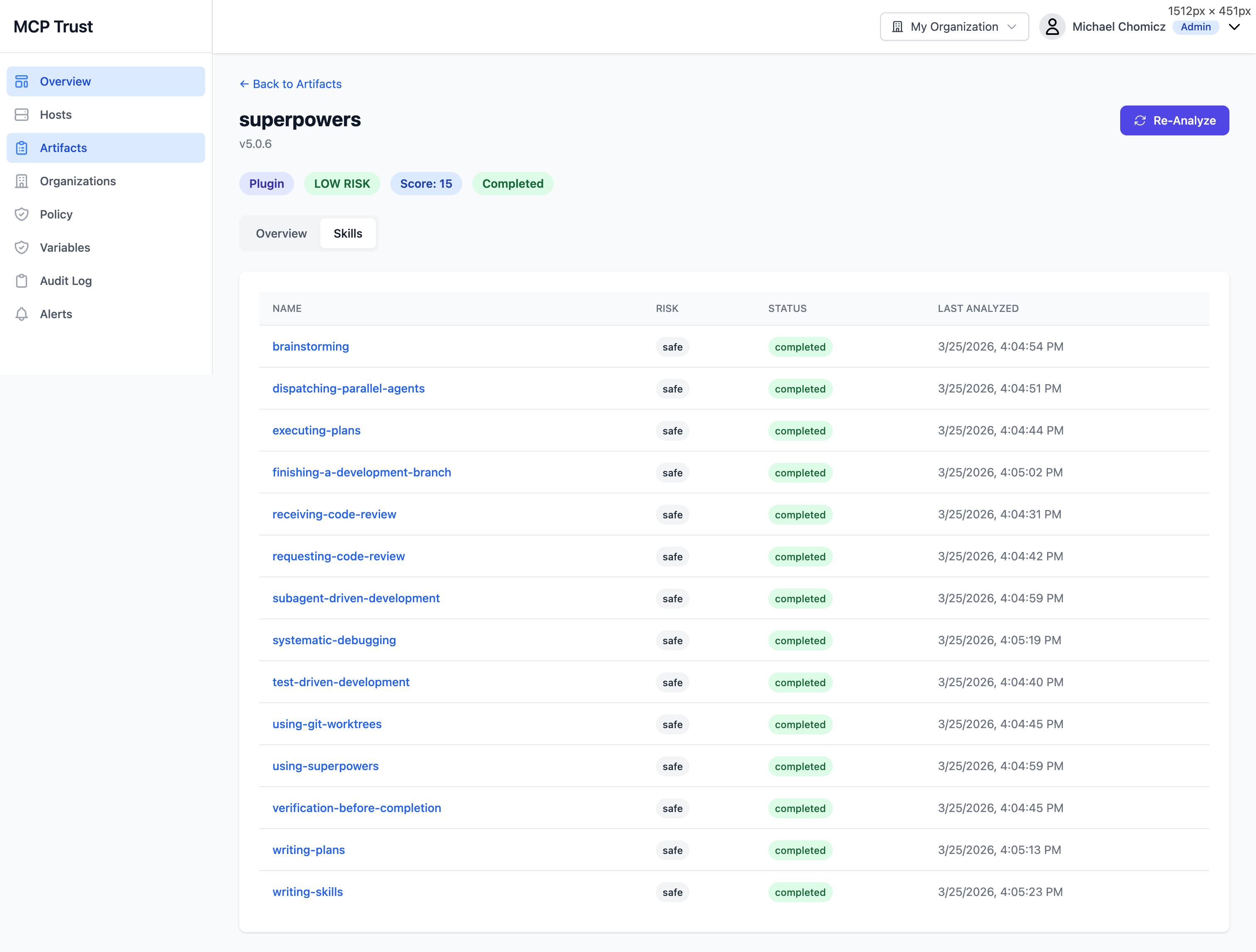
Claude Code plugins can expose multiple skills — individual scripts or hook handlers that execute in response to agent actions. The Skills tab on an artifact detail page breaks down the risk profile of each skill independently, rather than rolling everything into a single artifact-level score.
The Skills tab lists each skill with the following columns:
| Column | Description |
|---|---|
| Name | The skill identifier as declared in the plugin manifest. |
| Risk | Per-skill risk rating based on static analysis of the skill's source, the permissions it requests, and any secrets or dangerous patterns found within it. |
| Status | Whether the skill is currently Active, Pending Analysis, or Blocked by policy. |
| Last Analyzed | Timestamp of the most recent analysis run for this skill. Skills are re-analyzed when the parent plugin version changes or when manually triggered. |
Trust Scoring for Remote Endpoints
For MCP servers accessed over the network (remote endpoints such as mcp.slack.com or a self-hosted API), Truvant queries the Trust Intelligence Service to compute a trust score before allowing the endpoint to be used by an agent. This score is separate from the local scan risk score and evaluates the endpoint's standing as a remote service.
Trust scoring for remote endpoints evaluates the following signals:
- TLS configuration — Certificate validity, cipher suite strength, protocol version, and HSTS presence.
- Publisher reputation — Whether the domain and organization are associated with a known, verified publisher. New or anonymous publishers score lower.
- Authentication methods — Whether the endpoint requires authentication, what credential types it accepts, and whether credentials are transmitted securely.
- Tool risk levels — The aggregate L1–L4 risk profile of the tools the endpoint exposes, fetched from its MCP manifest.
- Community signals — Usage patterns, incident reports, and community feedback aggregated from the Truvant intelligence network.
The trust score is used by the policy engine to enforce the risk threshold you configure in your policy role. Endpoints scoring below your threshold are blocked automatically, even if the host is in Monitor mode.